
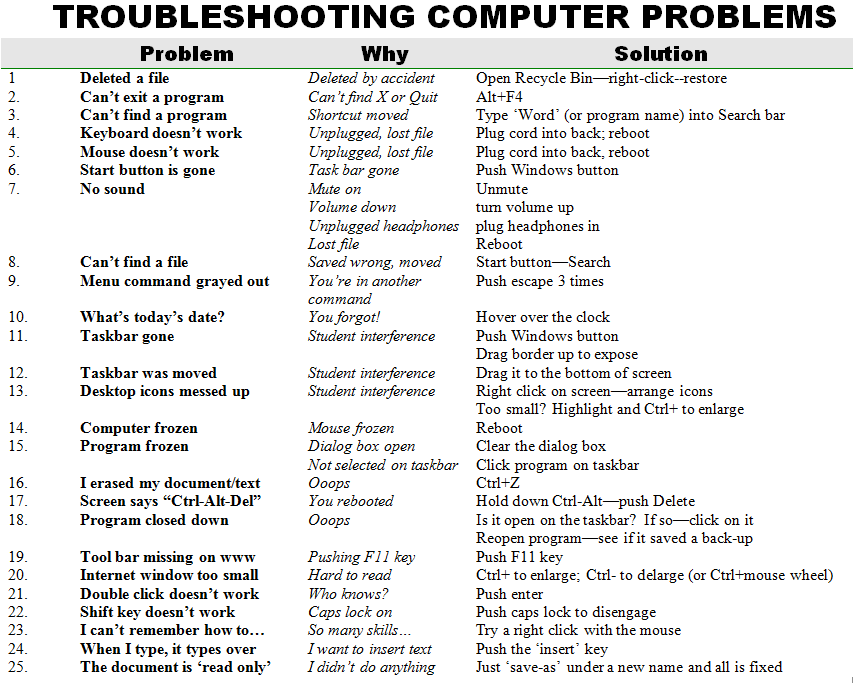
I received a lot of requests for copies of a document I published a year ago, Troubleshooting Common Computer Problems. At the suggestion of Edtech Sandy (aka Sandy Kendell), I tried to upload it through Google Docs to no avail (though it kind of worked in my WordPress.org site) so I’m guessing WordPress.com doesn’t allow Google Docs. Please feel free to disabuse me of that conclusion.
TROUBLESHOOTING COMPUTER PROBLEMS 2012
Jacqui Murray has been teaching K-18 technology for 30 years. She is the editor/author of over a hundred tech ed resources including a K-12 technology curriculum, K-8 keyboard curriculum, K-8 Digital Citizenship curriculum. She is an adjunct professor in tech ed, Master Teacher, webmaster for four blogs, an Amazon Vine Voice reviewer, CSTA presentation reviewer, freelance journalist on tech ed topics, a contributor to NEA Today, and author of the tech thrillers, To Hunt a Sub and Twenty-four Days. You can find her resources at Structured Learning.








 Ask a Tech Teacher
Gee thanks for this wonderful post! You always give us great information. I personally find this interesting and really clears me off from my questions.
I’m, beginning to know that I really learn lesser than I knew..
Anyway,
thanks mate!
LikeLike
I’m always surprised how many parents of my students don’t know these simple solutions. They think I’m brilliant when their children come home with these fixes. Hehe.
LikeLike
Pingback: Google Docs on WordPress « Ask a Tech Teacher
Hi, I’m Nicolene Esperanza Menezes and I am from Cape Town, South Africa. I have a problem; When i turn my p.c on It powers up and makes one beep which is good but my monitor doesn’t go on even though my monitor goes on when any other p.c is connected to it. What is the problem and how do i solve it. Thank you.
LikeLike
Hi Nicole, I’m sure you wiggled the plugs–that’s always a good starting point. Then unplug, count to ten and replug. Sometimes (more times than you’d believe) that fixes it.
If there’s no joy, it sounds like either the software for the video card in the computer box–the CPU–or the hardware itself. Is it still under warranty? Or, can you have someone check that?
Good luck! This is definitely a problem a third grader can’t solve!
LikeLike
i double click on the icon then a circle actually rotates near da curser and in another ten second it goes off …. tats it the applications are not working …it happens for fifa 10 and fifa 12
but not with all
in starting wen i tried fifa 12 it showed some dl_dx is missing and i used da dxl fixer and after tat i didnt get a mesage but instead am getting da circle rotates near da curser and goes …the app is not working.. .wat am i supposed to do
LikeLike
What app are you trying to use?
LikeLike
pls I need a solution to my problem.
My del laptop can not detect any external accessories or peripheral if I insert in my laptop port hub.
LikeLike
Check your drivers for the port. They may need an update. I have a similar problem right now with my HDMI port.
LikeLike
there is two possible solution for this kind of problem.
1. either your usb driver is not updated or
2. your usb port may be disabled in the computer.
Solve: right click on My computer->Manage->Device manager->now if your external accessories are for USB port the right click on the Universal Serial Bus and click on the update driver.
LikeLike
Hi,
You can also check your local group policy editor..
go to run
type gpedit.msc
under local computer policy
select administrative template
choose all settings
look and find all removable disk. be sure that the all the configuration there is “not configured”
Please comment if it works! Thanks
LikeLike
why cpu makes a beep sound.
LikeLike
Many beep sounds are standard. Is it giving you a problem?
LikeLike
i see a green line left side of my screen. it is present even in the time of booting. will you tell me a solution ? pls…….
LikeLike
It sounds like a hardware issue. How old is the monitor?
LikeLike
just 2 years
LikeLike
That’s not very old. Monitors should last 5+ years. It could be a driver issue, but those are hard to diagnose via internet. Are your video drivers up to date?
LikeLike
i also have same problem with my dell laptop how to solve it
LikeLike
Hi I’m Mark and I have a problem with my PC. It beginning to run slow. I have a licensed antivirus and it say’s that my PC doesn’t have any virus. I want to know what is the possible cause why it turns slow.(i don’t have many files saved)
LikeLike
Good you don’t have a virus. There are a lot of reasons why it could run slowly. Try Adaware and Spybot. They’ll help clean things out also. Also, run a defrag.
Good luck!
LikeLike
Mark, first check whether the Antivirus you have is still obsolete, if its licensing period has expired or not. Also make sure that you do not have multiple anti-viruses programs by going to control panel, programs. if so remove others. About the machine being slow; this could be as a result of low hard disk space. Some antivirus or malware programs may be too heavy for your PC. solution is for you to execute a disk cleanup: “Start > All Programs > Accessories > System Tools > Disk Cleanup.”
Defragment your hard drive: “Start > All Programs > Accessories > System Tools > Disk Defragmenter.”
Alternatively you may remove programs that you rarely use and clear temp folder. do this by running a reg. editor. good luck.
LikeLike
Why is my computer not being able to download resumes and won’t open them to see them?
LikeLike
Can you give me more detail? What’s the error message?
LikeLike
Pingback: Top Tech Tips of All Time « Ask a Tech Teacher
Pingback: Top Tech Tips of All Time « Ask a Tech Teacher
my computer dell processor fan produces a racing sound and does not display on the screen what could be the problem
LikeLike
You could have malware, or a virus that is causing your fan to run hard. Your processor could also be over loaded with too many programs running at the same time. Try to find out how old is your computer. You may need to have either the CPU upgraded, or you can have a more robust cooling fan installed in your Hard drive.
LikeLike
Pingback: What’s Trending on Ask a Tech Teacher « Ask a Tech Teacher
hi, im having a annoying problem ,my pc when turned on it wont beep and process info to the monitor. what may b the prob? pls help
LikeLike
Hi Rob
I always start with the basics–is the monitor plugged in, turned on? If you attach a different monitor to your CPU, does it work?
LikeLike
your cpu ,mother board 20 pin power connecion,12 volt 4 pin connection are not in good service, take out the connectors and replace it, remove memory card clean the connecting edges,replace it
LikeLike
Pleace am junioer computer maintainance. Pleace can u send me document by my address computer problem & solution. Pleace & 10q!
LikeLike
hi my problem is about desktop icons many times it changes different many files shape and not open y?
LikeLike
Cn you give me a few more details? I’ll see if I can help.
LikeLike
What are the common problems that the students encounter in the computer?
LikeLike
Hi Jocel
I’ve added the pdf and an image of 25 common problems. For some reason the Scribd doc isn’t showing up today.
BTW, I’ve moved this blog to http://askatechteacher.com
LikeLike
The file(s) that the icon(s) are for, may have been deleted, and are no longer on your computer. Scan your computer for viruses, then reboot your system.
LikeLike
when i turn on my computer power supply(socket) the cpu turns itself on and the monitor displays a yellow light instead of a blue light on the power button.Neither does the mouse nor the keyboard turn on.its a dell vostro.
LikeLike
Yellow is stand-by. The monitor is getting power, but not connected to the CPU. Start by checking the connections.
LikeLike
if any problem is encountered that seems unsolvable do visit the following site:
http://remotetechhelp.us/windowsseven.html
LikeLike
I do get questions about hardware which I can’t answer. I’m more of a software/widget gal.
BTW, the link doesn’t work. Can you update?
LikeLike
my system is running very slow at the booting time
LikeLike
Always start with a virus check and a defrag.
LikeLike
enter BIOS setup and access ‘power on self test’, ‘start up diagnostics’ ( disable this) . select/ look for an option called fast boot or quick boot and enable this. you can also change the boot priority by selecting the hard drive as the first boot option. save changes and reboot.
Alternatively, if your PC is more than one year old call an expert to flash/ update your BIOS to a later version.
your PC should be able to boot faster now. Good luck.
LikeLike
when I bring up internet explorer msn homepage I get a warning box message form webpage -object error – then I can’t do anything
LikeLike
Hi Ron
My first solution when browsers act up is to change browsers. There are so many add-ons and widgets, I don’t think any one browser can keep up. I keep FireFox, Chrome and IE open at all times so I can copy-paste an address from one to the other to get it to work correctly. I teach my students to do that, also.
LikeLike
What operating system are you using, some OS do not work with internet explorer, pliz try the latest browsers
LikeLike
Windows. I need to do a problem-solving for Macs!
LikeLike
hi mam
my computer problem
computer start and some minutes Before computer Turnoff Automatically
next time i will try open the computer but computer don’t open
but open next Day computer open & Turnoff Automatically
LikeLike
That’s happening to several of my lab computers. I’ll let you know if my IT guys come up with a solution.
LikeLike
Hi XD..if you are windows user try this solutions below:
possible solutions:
1.Restart F8 – then choose last known good confguration. does it work?
2. you can restore your system from last configuration of your windows. you can type system into search bar then it automatically showing up..then choose latest updates then click restore. does it work?
3. try to remove all your memory, clean it and then replaced both memory in your slots. does it work?
LikeLike
Thanks, Sniper. I’m going to try that.
LikeLike
your page was very helpful for us..thanks ^_^
LikeLike
Thanks, Sniper.
LikeLike
My Toshiba satellite Laptop takes too long to start up, i even get bored sometimes switch it off before going on
LikeLike
I will have to leave this for readers. I’m not too savvy about hardware.
LikeLike
Pingback: 10 Hits and 10 Misses for 2012 « Ask a Tech Teacher
Reblogged this on Solving Problems, with fun and commented:
Great guide for common computer challenges. MUST READ
LikeLike
Thanks, KC!
LikeLike
why cpu’s green globs continuously and seems not display on monitor?
LikeLike
I don’t understand, Oscar. Can you clarify?
LikeLike
Hi! Oscar , check your VGA Cable if fixed
LikeLike
blue sound bar pops up on my screen at various times freezing my keyboard. I replaced keyboard but problem still exists. Can you help ?
LikeLike
I’m not sure what a ‘blue sound bar’ is. Can you send a screen shot to askatechteacher at gmail dot com?
LikeLike
blue sound bar is a blue bar shown on my screen created by using the top right keys on a standard keyboard to increase ,decrease, or mute sound . shoud only appear whenkey is depressed to adjust sound butthe bar pops up at different times on its own and freezes my keyboard
LikeLike
I’m afraid I’m useless on this. When I depress those keys, they accomplish their purpose without bringing up a blue bar. Twere me (in your shoes), if it happens every time, I’d unprogram those buttons and use the volume control in the systray until I figured out the answer.
I suspect you tried reboot already?
LikeLike
I have a Asus DVD weiter. It’s not ejecting. I had this problem before. But now it’s not ejecting for about a month. Plz, give me solution……..
LikeLike
There’s a small hole under most DVD drives that allows for emergency eject. Slip a straightened paper clip into that hole, wiggle around until you feel it catch on something and then slowly remove. It should pop the drive out.
LikeLike
Hi Mam,
Am using acer laptop .. In this via touch pad not able to click any ico.. i need click the i.e left and right hand what ever we have in laptop.. via touch pad i can able move cozer but not able click or select..Please help me out this
LikeLike
Hi Ravi
I’m sorry I don’t think I understand your question? Will the laptop not allow mouse clicks or finger clicks?
LikeLike
Dear Jacqui
Finger click not working
LikeLike
Ravi, hook up a mouse through the USB drive and see if that works. That will narrow down the problem
LikeLike
in mouse no problem.. only in touch laptop touch this problem..
LikeLike
It could be a driver issue. Go to the Acer website. Search your laptop and see if there are fixes they offer. If it’s still under warranty, have the seller swap it for you.
I’ve heard of others with this problem. It’s not as unusual as you’d hope with laptops.
LikeLike
k Mam Thks Lot .. One more doubt.. Am using data cardin my laptop.. shall i connect in my mobile via bluetooth using same data card.. if possible how can do that
LikeLike
Now you’re outside my expertise. When I get stuck on a problem, I google it and YouTube it. Often, you’ll find help. Good luck! Tech surely stretches the brain, doesn’t it?
LikeLike
These are very frustrating issues!! visit yourpcproblems.com for professional technical support or any questions or email me at colin@yourpcproblems.com
LikeLike
Well, these 20 require only brainpower. Others–like crashed hard drive–not so much.
LikeLike
Pingback: What’s Trending on Ask a Tech Teacher | Ask a Tech Teacher
Pingback: What’s Trending on Ask a Tech Teacher « Ask a Tech Teacher
my computer having a green in the screen and i can’t read anymore the words in the screen because my screen is dancing …please can you help me
LikeLike
It sounds like a monitor problem. Can you give me more details?
LikeLike
My PC sound system did not work well..
i think i deleted some software by mistically…
so, what i do now..
LikeLike
Can you reinstall?
LikeLike
My laptop does not shutdown. When you click shutdown, it rather restarts unless I use the power button to shut it. What is the problem and how can I resolve it?
LikeLike
Something in the shutdown routine is hanging it up. Ctrl+Alt+Del and see if you can identify it.
LikeLike
Your advice has not offered real solution to my problem. Are there other steps that I can take?
LikeLike
Twere me, I’d probably do a reformat (after running virus/malware checks, defragging, and cleaning out the computer of old files. If you download a lot (don’t know if you do), expect to reformat every 6-12 months. It’s a pain.
LikeLike
I was charging my laptop when l noticed the laptop and the battery were extremely hot.now it won’t come on what do?
LikeLike
Oh boy. Let it cool and try again. Doesn’t sound good.
LikeLike
I was using my computer and it shut suddenly.
LikeLike
A very interesting blog you have got here, I personally am very comfortable with computers but its good to know that people actually respond and look over the web for such info. Highly appreciated.
As a matter of fact, I also run my blog, http://www.technosomes.com | A Technology Blog..
I wish you can take a look and maybe we can share some ideas on how to take it forward. Though the outlook is not entirely different.You being a veteran, it would be easy for you to assess my blog, and my writing style, provide some valuable feedback. Please write back to me..Appreciate your work here.
Cheers !!
LikeLike
Looks nice, Shantanu. Lots of techie news.
LikeLike
hii mam, my computer back button is not working. So i am closing every application which is opened, What is the solution to make it work?
LikeLike
I’d reboot. If you don’t want to close everything down, do a right-click on the internet page. The drop down list provides the ‘back’ option.
LikeLike
Pingback: What’s Trending on Ask a Tech Teacher « Jacqui Murray
Pingback: Computer Errors & Solutions #computererrorssolutions | A Listly List
I use acer aspire 5755 laptop windows 7 ultimate os ….now my system turn on every time config.ini notepad comming….i try several times delete it startup folder & msconfig startup item config.ini disable it but nothing again and again its problem come…kindly help me
LikeLike
Pingback: Fix Wrc 4 Pc Sound Problem Windows XP, Vista, 7, 8 [Solved]
I want you to please help to list 20 problems of computers and solutions to them.
LikeLike
Hi Alhaji–it’s downloadable from that Scribd link. Enjoy!
LikeLike
The solutions provided above are very helpful. But for some computer problem such as BSOD’s, slow PC etc., one has to contact the expert to resolve the issue. I always prefer to call on the toll-free number of AskPCTechies to resolve the issue completely.
LikeLike
Absolutely. These are only the ones K-5 students can easily solve. Thanks for the link, James.
LikeLike
Hi i am adi from india. When i connect a LAN through a lan cord my pc dont show anything. Then i want to try update the driver but its not happening and saying windows cant update. Please help me to fix this problem. Thanks in advance
LikeLike
wheathr s it activated or not?
LikeLike
please give us the main error occur. are you trying to access the network through LAN?
LikeLike
sir, i have connected my pc to an android tab via a data cable. But after that my pc’s display changed, became greyish. tell me the solution of the problem.
LikeLike
my problem is that i have not any icon saw in my compter
LikeLike
my laptop inspiron n4050 is making noise when i use internet it heats up and battery timing is decreasing day by day what should i done plz rply…
LikeLike
help me..i need it as soon as possible.what are the types of online computer problem and trousblehoot?? give me an example o..i dont understand much..i’m doing my assignment.
LikeLike
thank you! i need more on computer hardware problem and solution
LikeLike
This might help you out, 😀
http://techsupport.uspctechcenter.com/
LikeLike
i started my computer after nearly 2 months and as soon as i started my pc a black screen appeared and it said error…disk failure or system not booted…..it also said media test failure and check ur cable…..pls help me..
LikeLike
i want a chart on the topic common computer problems
LikeLike
When I switch on the computer and turn on the cup the moniter doeanot turns on on the moniter it is written that “in power safe mode move your mouse or press any key of the keyboard and when I move the mouse nothing happens and my keyboard is new bit still there is no light flowing on it. Please help me.
LikeLike
Hi.. I m using samsung lap.. Last 2days i m switch on d lap bt display was not on.. I tried to press on button 60sec nd i removed my battery again i fixed.. Then also display was not on.. I checked ram also..pls gve me a solution…
LikeLike
hi my hp loptop is not working properly when i open firefox it takes time too and sometime i get a message from my antivirus tat your computer might be at risk what to do?
LikeLike
Pingback: How to not spend your money paying someone to fix these 5 problems. – Dare's world
what is the best anti virus that you use
LikeLike
If you have Windows, their built-in anti-virus is great. That’ll take care of problems.
LikeLike
thank u very much u’ve just made my work easy.
LikeLike
My pleasure, Bentone.
LikeLike
Pingback: What’s Trending on Ask a Tech Teacher | Ask a Tech Teacher
Pingback: 10 Hits and 10 Misses for 2012 | Ask a Tech Teacher